Table of Contents
Two developers get the same project. One ships it in three weeks. The other is still fixing things three months later, breaking the live site every time they deploy, and cannot remember which file on the server is the current one.
The difference is almost never talent. It is workflow: the small set of habits and automated steps that sit between “I had an idea” and “it is live and it works”. This guide walks one real project through all six stages, with the actual config files you can copy, so you leave with a workflow rather than a list of nouns.
What you get (13 minute read):
✓ The six-stage pipeline every professional project moves through
✓ A clickable pipeline: pick a stage, see the tools and the commands
✓ Copy-ready configs: ESLint, Prettier, a pre-commit hook and a full deploy pipeline
✓ How to choose a CMS and stack without a 40-point checklist
✓ A version that works if you are a solo freelancer, not just a ten-person team
The Pipeline
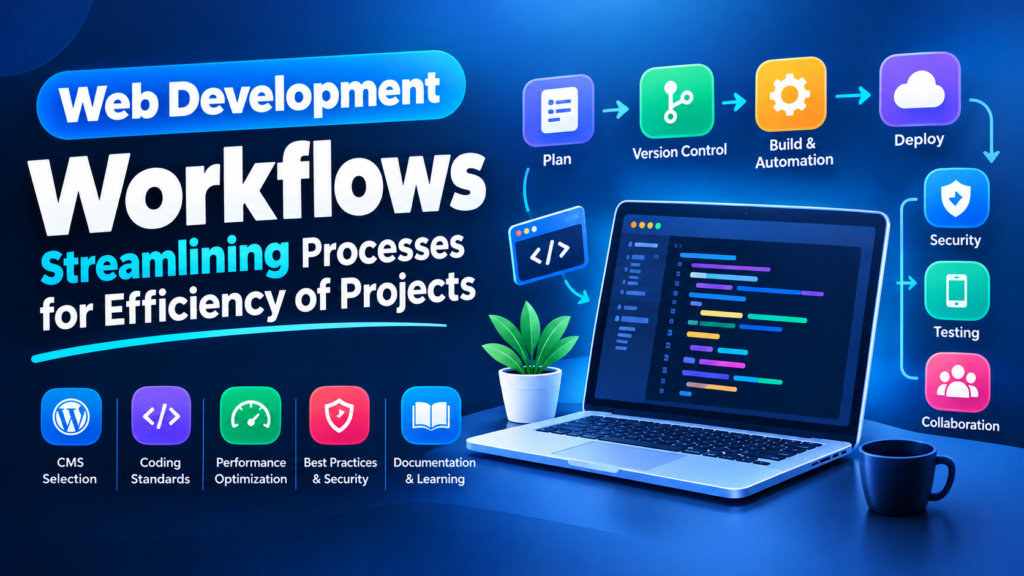
Every professional project, whether it is a one-person WordPress site or a product with fifty engineers, moves through the same six stages. The difference between slow teams and fast ones is how much of this is automatic.
Click a Stage
Each stage has a job, a few tools, and usually one command. Pick one.
Stage 1: Plan Before You Open the Editor
The most expensive bug is the feature nobody wanted. Before any code, write down what the project must do, what it must not do, and what “finished” looks like.
Then break it into tasks small enough to finish in a day. A task called “build the site” sits untouched for weeks. A task called “add contact form validation” gets done this afternoon.
The same four columns work in Trello, Jira, Asana, Notion or GitHub Projects. The tool matters far less than the habit (illustration).
The one rule that makes boards work: only one card in “In Progress” at a time, per person. Three half-finished tasks deliver nothing; one finished task delivers something. If a task is too big to finish in a day, it is not a task yet, it is a project.
Stage 2: Build on a Branch
Never work directly on main. One branch per task keeps your unfinished work away from the version that is live, and makes it trivial to abandon an idea that did not work.
# Start from an up-to-date main
git switch main
git pull

# One branch per task, named after the task
git switch -c feature/14-mobile-nav

# ...work, then commit in small pieces
git add src/nav.js
git commit -m "feat(nav): close menu when a link is tapped"

git push -u origin feature/14-mobile-nav
| Branch name | Use it for |
|---|---|
feature/14-mobile-nav | New work, with the task number so anyone can find the ticket |
fix/22-form-validation | A bug fix |
chore/update-deps | Housekeeping that does not change behaviour |
Commit messages with a shape
Pick a convention and keep it. The common one is type(area): what changed. It takes two days to get used to and makes your history readable forever, and tools can generate changelogs from it automatically.
feat(cart): add quantity selector
fix(nav): close menu when a link is tapped on mobile
perf(images): convert hero images to WebP
docs(readme): add local setup steps
chore(deps): update eslint to v9

# Instead of:
update
fix stuff
final changes v2
New to branches and merges? Start with our guide to web version control, which has an interactive commit tree, then come back here.
Same commands for everyone: npm scripts
Put every routine command in package.json. Then nobody has to remember flags, and a new person on the project can start in one minute.
{
  "scripts": {
    "dev":      "vite",
    "build":    "vite build",
    "preview":  "vite preview",
    "lint":     "eslint . --max-warnings 0",
    "format":   "prettier --write .",
    "test":     "vitest run",
    "check":    "npm run lint && npm run test && npm run build"
  }
}
Now the whole project has one entry point: npm run check before you push. If that passes, you are unlikely to break anything.
Stage 3: Review Before It Goes Anywhere
Open a pull request even if you are the only person on the project. It gives you one page showing exactly what changed, a place for the automatic checks to report, and a record of why you did it.
✓ tests — 18 passed in 31s
✓ build — passed in 48s
✓ preview — pr-27.preview.yoursite.com
A pull request with automatic checks and a preview link. The reviewer looks at the change, not the whole project (illustration).
A review checklist that fits on one screen
Stage 4: Let the Machine Do the Checking
Anything a tool can catch, a human should never be checking by hand. Formatting arguments in code review are a waste of everyone’s week, so delete them with configuration.
Formatting and linting
npm install -D eslint prettier eslint-config-prettier husky lint-staged
npx eslint --init
npx husky init
{
  "semi": true,
  "singleQuote": true,
  "printWidth": 100,
  "tabWidth": 2,
  "trailingComma": "es5"
}
Then make it impossible to commit code that fails. This hook runs the linter on the files you actually staged, every time you commit:
// package.json
{
  "lint-staged": {
    "*.{js,jsx,ts,tsx}": ["eslint --fix", "prettier --write"],
    "*.{css,md,json}":   ["prettier --write"]
  }
}

# .husky/pre-commit
npx lint-staged
$ git commit -m "feat(nav): close menu on tap"
✓ Preparing lint-staged...
✓ Running tasks for staged files...
✗ eslint --fix found 1 problem

  src/nav.js:22  error  'menuEl' is assigned a value but never used

husky - pre-commit script failed (code 1)
The mistake is caught on your own machine, seconds after you made it, instead of by a colleague two days later.
Checking it works everywhere
Responsive design and cross-browser testing belong here too. Most of it you can do free, in the browser you already have.
Stage 5: Deploy Without Fear
Manual deployment is where most small projects lose their evenings. Dragging files over FTP means no record of what changed, no way back, and a live site that breaks at 11pm.
Here is a complete pipeline. Push to main, and it checks everything and publishes only if the checks pass.
name: Deploy

on:
  push:
    branches: [main]
  pull_request:              # run the checks on PRs too

jobs:
  check:
    runs-on: ubuntu-latest
    steps:
      - uses: actions/checkout@v4

      - uses: actions/setup-node@v4
        with:
          node-version: '20'
          cache: 'npm'

      - run: npm ci            # exact versions from package-lock
      - run: npm run lint
      - run: npm test
      - run: npm run build

      - name: Upload the built site
        uses: actions/upload-artifact@v4
        with:
          name: dist
          path: dist/

  deploy:
    needs: check               # only if every check passed
    if: github.ref == 'refs/heads/main'
    runs-on: ubuntu-latest
    steps:
      - uses: actions/download-artifact@v4
        with:
          name: dist
          path: dist

      - name: Publish to the server
        env:
          DEPLOY_KEY: ${{ secrets.DEPLOY_KEY }}   # never in the file
        run: ./scripts/deploy.sh
✓ npm ci 19s
✓ npm run lint 14s
✓ npm test 31s
✓ npm run build 48s
✓ deploy 12s
An illustration of a pipeline run. GitHub Actions is free for public repositories and has a generous free allowance for private ones.
Secrets never live in the file. Keys go in your platform’s secrets store (Settings → Secrets in GitHub) and arrive as environment variables at run time. A deploy key committed to a repository is a key you have to replace.
Have three environments, not one
| Environment | Who sees it | What it is for |
|---|---|---|
| Local | Just you | Writing the code, breaking things freely. |
| Staging or preview | You and the client | A real URL, with real-looking data, for approval before launch. |
| Production | Everyone | The live site. Only ever updated by the pipeline, never by hand. |
For client work, preview links change everything. Instead of “I made the changes you asked for”, you send a link to the exact version. Netlify, Vercel and Cloudflare Pages create one automatically for every pull request, free.
Stage 6: Watch What Happens Next
Shipping is not the end of the workflow. A deployment you do not measure is a guess.
# Fix forward if it is small and obvious.
# Otherwise, undo the deploy first and investigate calmly.

git revert <the-bad-commit>     # a new commit that undoes it
git push                        # the pipeline redeploys the good version

# Note: `git revert` is safe on shared branches.
# `reset --hard` and `push --force` are not.
Choosing the Stack Without a 40-Point Checklist
Long CMS comparison checklists are not much use when you are choosing on a Tuesday afternoon. In practice the decision usually comes down to three questions.
The factor the checklists miss: who maintains this after launch. A beautifully engineered custom site is a liability if the client’s only technical help is a cousin who knows WordPress. Choose the tool the people who will live with it can actually use.
If You Are One Person, Not a Team
Most workflow advice assumes a ten-person team with a scrum master. Here is the honest version for a freelancer or a solo developer, because the goal is not ceremony, it is not losing work and not breaking the live site.
| Practice | Big team | Solo or freelance |
|---|---|---|
| Task tracking | Jira with sprints and estimates | A Trello board or a notes file with four columns. Keep it. |
| Branches | Git Flow with release branches | Just main plus one branch per task. That is enough. |
| Code review | Two approvals required | Open the PR anyway and read your own diff. You will catch things. |
| Tests | High coverage, several layers | Tests only for what is expensive to break: payments, forms, logins. |
| CI/CD | Multi-stage pipelines | One workflow file. Push to main, it deploys. Worth an hour of setup. |
| Documentation | A full internal wiki | One good README. Future you is a different person. |
| Stand-ups | Daily, fifteen minutes | Skip. Write tomorrow’s three tasks before you close the laptop. |
The README that saves you an hour every time
# Client Site

What it is: marketing site + blog for Acme Ltd.
Live: https://acme.com  ·  Staging: https://staging.acme.com

## Run it locally
    npm install
    cp .env.example .env     # ask me for the real values
    npm run dev              # http://localhost:5173

## Before you push
    npm run check            # lint + tests + build

## Deploying
Push to `main`. GitHub Actions does the rest.
Rollback: `git revert <commit>` and push.

## Things that will confuse you
- Images are optimised at build time, so add originals to /src/images.
- The contact form posts to a Netlify function, not to the CMS.
- Staging uses a copy of the database, refreshed every Monday.
That last section is the valuable one. “Things that will confuse you” is where you write down every trap you fell into, for the person who inherits this project, who is usually you in eighteen months.
Where Workflows Actually Break
| The problem | What it looks like | The fix |
|---|---|---|
| Editing files on the live server | No record of changes, no way back, and local code that no longer matches | Deploy from Git only. Treat the server as read-only. |
| Tasks too big to finish | “Build the dashboard” sitting in progress for three weeks | Nothing bigger than one day. Split until it fits. |
| Automating nothing | Twenty minutes of manual steps per deploy, so you deploy rarely and nervously | One workflow file. The setup pays for itself within a month. |
| Automating everything at once | Two weeks building a perfect pipeline for a three-page site | Add automation when a manual step has annoyed you three times. |
| Formatting arguments in review | Comments about spaces and quote marks instead of logic | Prettier decides. Nobody debates it again. |
| No staging | The client reviews changes on the live site, in front of customers | Preview deployments on every pull request. |
| Dependencies never updated | A year of neglect, then a scary upgrade that breaks everything | Small updates monthly. Let Dependabot open the pull requests. |
Common Questions
Is all this overkill for a small website?
Some of it, yes. For a three-page brochure site you do not need test suites and staging databases. But Git, a branch per task and an automatic deploy take about an hour to set up and pay off on the very first “can you change the heading” request. Start there and add the rest when you feel the pain.
How long does it take to set up a pipeline?
For a straightforward site, one afternoon, most of it spent on credentials. After that it is one file you copy into every future project, which is the real return.
Do I need Jira, or will Trello do?
Trello, Notion or GitHub Projects are fine for small teams and solo work. Jira earns its complexity on larger teams who need reporting across many projects. Picking the heavier tool first is a common way to end up with a board nobody updates.
What is the difference between continuous integration and continuous deployment?
Integration is the checking part: every push runs the linter, tests and build. Deployment is the publishing part: if the checks pass, it goes live automatically. You can have the first without the second, and that is a sensible place to start.
Should I use Grunt or Gulp?
Probably neither, in 2026. Those task runners were essential when nothing else bundled assets. Today Vite handles development and builds for most projects with far less configuration, and npm scripts cover the rest. If you inherit a Gulp project it still works, but do not start a new one with it.
My client keeps changing their mind. Can a workflow fix that?
Not fix, but it contains the damage. Small tasks, short cycles and preview links mean changes are caught after a day rather than after a month. Write down what was agreed, and treat new requests as new tasks rather than “small tweaks”.
Read next: Understanding Web Version Control for the Git half of this, and SEO Best Practices for Web Developers for the launch checklist.
Final Thoughts
A workflow is not paperwork. It is the set of decisions you make once so you never have to make them again at 11pm with a client waiting. Plan it, branch it, review it, test it, deploy it, watch it, and most of the panic goes out of the job.
Do not try to adopt all six stages tomorrow. Pick the one that hurts most right now, probably deployment, automate that, and come back for the next one. Which stage is your weakest? Tell me in the comments. I read every one.
If this was useful, share it with someone still deploying by dragging files into FileZilla.