Table of Contents
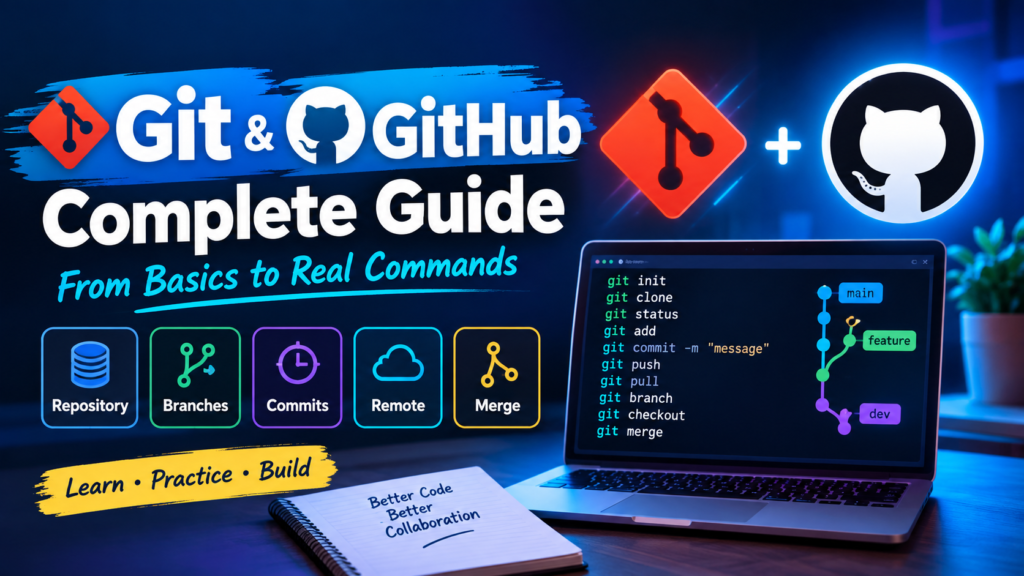
If you’re starting out in web development, you’ll hear about Git and GitHub constantly. They sound similar and work together, but they’re not the same thing. This guide explains what each one is, how they differ, why Git matters, and the basic commands you need to get started.
In this guide
1. What is Git?
Git is a distributed version control system that lets developers track changes, collaborate on projects and manage code history efficiently. You can create and work on multiple branches, save changes with commits and merge branches smoothly. Git keeps a complete record of every change in your project, making teamwork easier while protecting the integrity of your code.
Fun fact: “Git” is British slang for an unpleasant or annoying person. Torvalds jokingly chose the name to reflect his frustration with the version control systems that existed at the time.
2. What is GitHub?
GitHub is a web-based platform built on top of Git. It acts as a collaboration hub for software development, giving you tools to host and manage Git repositories online. Developers use it to share code, contribute to projects and work together through features like pull requests for code review, issue tracking and project management.
The founders wanted to make collaborative software development simpler, so developers could easily work together on projects using Git.
3. Git vs GitHub: The Main Difference
Git and GitHub serve different roles in version control and collaborative development:
Git
- A distributed version control system that tracks changes to source code.
- Lets many developers work on a project at the same time, independently.
- A command-line tool that runs locally on your computer for commits, branches and merges.
GitHub
- An online platform that hosts Git repositories.
- Adds collaboration, code hosting and project management on top of Git.
- Offers remote repos, pull requests, issues and a graphical interface.
- Has social features, making it popular for open-source projects and communities.
4. How Git and GitHub Work Together
GitHub uses Git underneath. When you push code to a GitHub repository, Git handles all the version control work.
Developers usually use Git locally on their computers for daily version control, while GitHub acts as the remote repository where code is hosted and shared. A typical collaboration flow looks like this:
1Pull
Fetch the latest changes others have made from the remote repository.
2Modify
Make your changes and commit them locally with Git.
3Push
Send your committed changes back to the remote repository on GitHub.
In short: Git is the version control system; GitHub is a hosting and collaboration platform built on Git. Its web interface makes it easy to share code, collaborate and manage repositories.
5. Key Benefits of Using Git in Web Development
Version Control
Every change is saved as a commit, creating a detailed history of your project.
Benefit: Roll back to earlier versions, see how code evolved and communicate better.Collaborative Development
Several developers can work on the same project at once, each on their own branch.
Benefit: Parallel work, isolated changes and simpler teamwork.Branching & Merging
Create branches for features or bug fixes, then merge them back into the main code.
Benefit: Flexibility, separated tasks and easy integration of changes.Distributed System
Every developer has a full copy of the repository on their own machine.
Benefit: Work offline and collaborate from anywhere.Code Reviews
Platforms like GitHub and GitLab offer pull requests to review code before it’s merged.
Benefit: Better code quality and stronger team feedback.Together, these benefits make development more efficient, organized and collaborative, which is why Git has become the industry standard for version control.
6. Basic Git Concepts
Before using commands, it helps to understand these core terms:
Repository (Repo)
The folder or storage space where your project and its version history are saved.
Commit
A snapshot of changes at a point in time, with a unique ID (hash).
Branch
A separate line of development, so you can build features independently.
Remote
A version of your repo hosted on a server, like GitHub, GitLab or Bitbucket.
Clone
Making a copy of a remote repository on your local machine.
Pull
Getting changes from a remote repo and merging them into your current branch.
Push
Sending your committed changes to a remote repository.
Merge
Combining changes from different branches into one branch.
7. Basic Git Commands
Click Copy on any command to copy it straight to your terminal.
1Initialize a repository
git initCreates a new Git repository in the current folder.
2Clone a repository
git clone <repository_url>Copies a remote repository to your local machine.
3Check status
git statusShows untracked, modified and staged files.
4Stage changes
git add <file>Prepares changes for the next commit.
5Commit changes
git commit -m "Commit message"Saves staged changes with a descriptive message.
6View history
git logLists all commits in chronological order.
7Create a branch
git branch <branch_name>Creates a new branch.
8Switch branch
git checkout <branch_name>Moves you to a different branch.
9Merge branches
git merge <branch_name>Merges another branch into your current branch.
10Pull from remote
git pull origin <branch_name>Fetches remote changes and merges them in.
11Push to remote
git push origin <branch_name>Sends your commits to the remote repository.
Final Thoughts
These are the most fundamental Git concepts and commands. Once you understand them, you’ll have a solid foundation for advanced version control and smooth collaboration in any software project.