Table of Contents
I have been watching the AI hardware race for a while, and it has mostly been about size. Bigger clusters, bigger GPU orders, bigger cloud contracts. Every few months another company announces billions in data centre spending, and the message to everyone else is the same: you rent your AI from the giants.
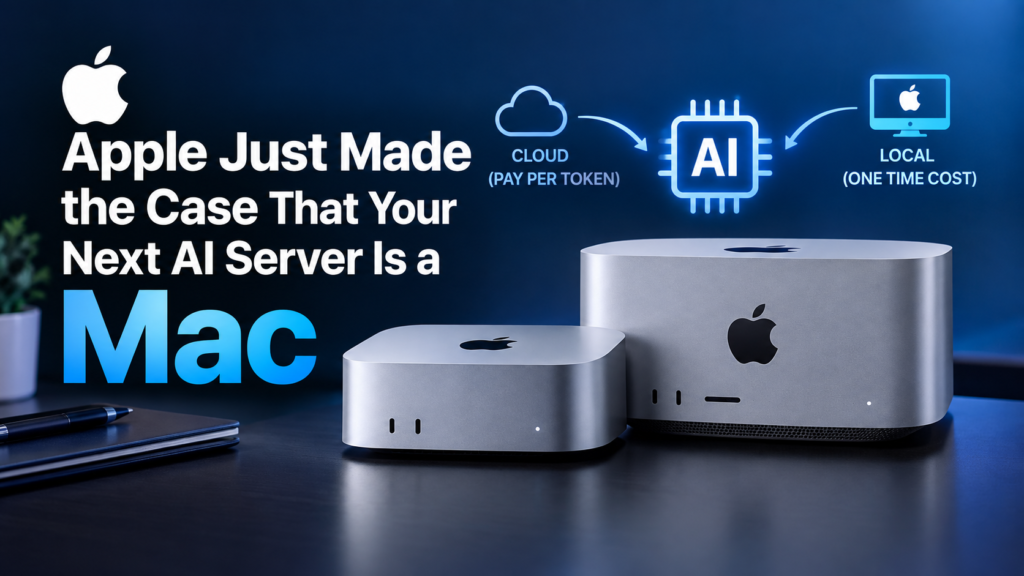
On 22 September, Apple quietly pushed back on that idea. It launched the new Mac mini and Mac Studio and positioned them as a cheaper alternative to cloud AI for businesses. The machines were not a surprise, since Apple announced them back in August. The pitch was. Apple is not only selling faster computers for video editors. It is telling companies they may not need to rent anyone’s data centre at all.
That is a bold claim, and it deserves a closer look. Below I have added a calculator so you can run the numbers for your own situation, because the honest answer depends entirely on them.
In this article:
✓ What actually shipped, and what it costs
✓ Why the real argument is about billing, not benchmarks
✓ A break-even calculator: your cloud bill against the price of a Mac
✓ Why unified memory makes Macs unexpectedly good at this, explained with a diagram
✓ Which models actually fit in how much memory
✓ Where the cloud still wins, and the caveats worth knowing before you spend
So What Actually Shipped?
Two machines, aimed at very different budgets.
The Mac mini is the one most people will actually buy. Small, quiet and relatively cheap, with the new model starting at around $899. Plenty of people were already using older Mac minis as little always-on AI boxes, so this mostly makes official what the community was doing anyway.
The Mac Studio is the serious one. The top M5 Ultra configuration goes up to a 36-core CPU, an 80-core GPU and 512GB of unified memory with 1.2TB/s of bandwidth, and Apple says it can run very large AI models entirely on the machine. One catch: the 512GB configurations are not due until late October, so the most impressive version is not in anyone’s hands yet.
It is not cheap either. Fully loaded, these can come close to $20,000. That sounds like a lot until you compare it with what some companies pay for cloud AI every month, which is exactly where Apple wants your mind to go.
| Mac mini | Mac Studio (M5 Max) | Mac Studio (M5 Ultra) | |
|---|---|---|---|
| Starting price | around $899 | mid range | up to around $20,000 loaded |
| Memory ceiling | Modest | Large | 512GB unified |
| Memory bandwidth | Lower | High | 1.2TB/s |
| GPU | Integrated | Large | 80 cores |
| Realistic role | An always-on box for small models and personal agents | A team’s shared AI machine | Large models in one box, or several linked together |
Prices and specs as reported at launch. Configurations and availability vary by region, so check Apple’s own store page before budgeting.
The Real Pitch Is About How You Pay
This is the part I find most interesting, because it is not really a technology argument. It is a billing argument.
When you use AI through the cloud you usually pay per token. Tokens are the small chunks of text a model reads and writes, and every one of them costs something. For a casual user that is nothing. For a company running coding assistants all day, or agents chewing through documents around the clock, those costs add up quickly and they never stop.
Apple’s answer is to buy the machine once and stop paying the meter. In a Reuters interview, Apple hardware chief Johny Srouji argued that a machine a company owns can keep doing AI work without a provider charging for every token. Apple is aiming at the heavy, repetitive work, such as writing code and processing business documents, that would otherwise mean paying per token to a model provider.
I understand the appeal. Finance teams hate unpredictable bills, and AI bills are about as unpredictable as they come. A Mac on a desk costs the same whether it processes one million tokens this month or a hundred million.
The shape of the argument. Where that green line sits is the only question that matters, and it is different for every team.
RUN YOUR OWN NUMBERSThe Break-Even Calculator
Here is the thing marketing never does for you: the arithmetic. Put in what you spend on AI each month, pick a machine, and see how long it takes to pay for itself.
Rough figures only. Owning includes about $40 a year of electricity for a machine drawing roughly 40W around the clock, which is about 350 kWh a year; multiply by your own rate. It does not include someone’s time to maintain the machine, and it assumes your cloud spend stays flat, which it usually does not.
The number that calculator cannot show you is how busy the machine is. A $20,000 Mac Studio that sits idle half the time is an expensive paperweight. Local hardware pays off when your AI use is constant and predictable: a development team with coding assistants running all day, a business processing thousands of documents a week, or anyone with sensitive data they would rather not send to a third party.
Why Macs Are Weirdly Good at This
What I find a little funny is that Apple did not set out to build AI machines. It stumbled into it.
When Apple moved to its own chips in 2020, it merged computing and memory into a single unified design, mainly to improve battery life. That close link between processor and memory, which Nvidia and others have only recently moved toward, happened to make Macs very good at AI.
Here is why that matters. Large language models are enormous, and the bottleneck in running one is usually memory, not raw computing power. On a typical PC the model has to fit inside the graphics card’s own memory, which is limited and expensive. On a Mac the GPU can draw on the whole pool of system memory. So a single Mac Studio with a lot of RAM can hold a model that would otherwise need several costly GPUs.
Memory, not teraflops, is what decides whether a model runs on your desk at all.
Apple has also been adding features aimed squarely at this use. Mac Studios began as creator machines for video and music, but over the past two years Apple has quietly added things like RDMA over Thunderbolt, a custom way of connecting chips across machines. In plain terms, you can link several Macs and have them work as one bigger computer.
Apple showed that off at launch, and it was a good demo: four linked Mac Studios running a trillion-parameter model that found and fixed a bug in graphics code. A trillion parameters is frontier-model territory, and it was running on hardware you could fit on one shelf.
The demand is already real, too. Mac minis started selling out as OpenClaw, an open-source agentic AI tool, took off in places like China. Apple is partly following its customers here, not leading them.
How Much Memory Does a Model Actually Need?
This is the table I wish every article about local AI included, because it turns “512GB” from a marketing number into something you can plan with. These are rough figures for the compressed (quantised) versions people actually run at home, and they leave room for the conversation itself.
| Model size | Roughly needs | Runs comfortably on | Good for |
|---|---|---|---|
| 7B to 8B | 5–8 GB | Any modern Mac, including a base mini | Chat, summaries, simple code help |
| 13B to 14B | 9–12 GB | 16GB machine and up | Better reasoning, decent coding |
| 30B to 34B | 20–25 GB | 32GB and up | Serious coding assistance |
| 70B | 40–48 GB | 64GB and up | Close to cloud quality for many tasks |
| Very large (200B+) | 120 GB and beyond | A high-memory Mac Studio | The configurations Apple is advertising |
| Frontier scale | Hundreds of GB | Several machines linked together | Apple’s four-Studio demo |
A useful rule of thumb: a model compressed to about 4 bits needs roughly half a gigabyte of memory per billion parameters, plus a few gigabytes of working room. So a 70B model lands around 40GB. Keep about a quarter of your memory free for the operating system and your actual work.
What This Looks Like in Practice
None of this is theoretical. You can try the idea on whatever machine you already own, today, for nothing. Ollama downloads and runs open models locally with one command.
# Install on a Mac
brew install ollama

# Start the little local server
ollama serve

# Pull and chat with a small model (about 5GB)
ollama run llama3.1:8b

# See what is loaded and how much memory it is using
ollama ps
$ ollama ps
NAME             SIZE     PROCESSOR    UNTIL
llama3.1:8b      6.1 GB   100% GPU      4 minutes from now

$ ollama run llama3.1:8b "explain unified memory in one sentence"
Unified memory lets the CPU and GPU share one pool of RAM, so large
models can be loaded once instead of copied into separate video memory.
Example output. “100% GPU” is the line that matters: the whole model is in memory, so answers come back fast.
And because Ollama exposes a local API, anything you have already written against a cloud model can usually be pointed at it with one URL change:
// Same shape as a cloud call. No API key, no per-token bill.
const res = await fetch('http://localhost:11434/api/chat', {
  method: 'POST',
  headers: { 'Content-Type': 'application/json' },
  body: JSON.stringify({
    model: 'llama3.1:8b',
    stream: false,
    messages: [{ role: 'user', content: 'Summarise this invoice in 3 bullets...' }]
  })
});

if (!res.ok) throw new Error(`Local model error ${res.status}`);

const data = await res.json();
console.log(data.message.content);
Memory Used 46.21 GB (ollama · llama3.1:70b)
Cached Files 12.40 GB
Swap Used 0 bytes
What “unified memory” means in daily use: the model simply sits in RAM (illustration).
Try before you buy, seriously. Run a small model on your current laptop for a week and see whether local AI actually fits how you work. We have a full guide: Ollama: How to Run AI Locally on Your Computer for Free.
The Fight With Microsoft and Nvidia
Apple has competition, and it is coming soon. These Macs will go up against new AI desktops from Nvidia and PC makers, which are expected to headline a Microsoft Windows event in San Francisco next month. So in a few weeks we will get a real side-by-side comparison, and I suspect the argument will get loud.
Apple also has a much bigger problem than specs. According to IDC’s Linn Huang, Apple holds about 4.6 percent of the enterprise desktop market against 91.3 percent for Windows.
Most corporate IT departments are built entirely around Windows, with the tools, security software and staff habits to match. Asking them to bring in Macs as AI servers is a much bigger request than asking them to buy faster hardware.
Apple does have one clever angle. Srouji said Apple is telling corporate buyers that models built for its devices scale from the cheapest iPhones and iPads up to the most expensive Mac Studios, because the chips share the same basic design. If your company already builds iPhone apps, that consistency is a genuine selling point: build once, run anywhere in the Apple ecosystem.
Okay, But Is It Actually Cheaper?
Here I want to be honest, because the marketing makes it sound simpler than it is. Buying a Mac instead of paying per token is a different way of paying, not automatically a cheaper one. The real question is how much useful work the machine delivers over its life compared with doing the same work in the cloud.
Three costs the comparison usually leaves out. Someone has to set the machine up and keep it running. A single machine is a single point of failure, so what happens when it dies mid-week? And local models, however good, are generally a step behind the latest frontier cloud models, so part of what you are buying is a decision to be slightly behind in exchange for a flat bill.
What This Really Means
Step back from the specs and there is a bigger story. The first wave of AI was almost entirely rented. We paid for API calls, cloud GPUs and monthly subscriptions, and very few of us owned anything. Now models are getting more efficient and hardware is getting more memory, so some of that work is starting to move back onto machines people actually own.
It reminds me of the shift from mainframes to personal computers. Computing started centralised and expensive, then gradually moved onto desks. AI might be at the start of a similar swing.
I do not think Apple is going to take over the data centre, and I doubt it is trying to. But if even a small slice of businesses decides that a few Mac Studios make more sense than an endless token bill, Apple will have found a way into corporate IT it has chased for decades.
Common Questions
Can I really run serious AI on a Mac mini?
You can run small and medium models very comfortably: 7B to 14B class models are fine on a modest machine and are genuinely useful for summaries, drafting and simple coding help. What a mini cannot do is hold the very large models, which is the whole reason the high-memory Studio exists.
Is a local model as good as a cloud frontier model?
Generally not, and it is worth being clear about that. Open models have improved enormously, and for routine work the difference is often invisible. For the hardest reasoning tasks, the best cloud models still lead. Many teams end up using both: local for the constant, routine volume, cloud for the hard questions.
Why not just buy an Nvidia GPU instead?
For raw speed on models that fit in its memory, a high-end Nvidia card is usually faster. The problem is capacity: consumer cards top out well below what large models need, so you buy several, which gets expensive and complicated. Apple’s pitch is capacity per dollar, not peak speed, and that is a trade worth measuring against your own models.
What about privacy? Is that the real selling point?
For some businesses, yes, and I think it is underrated in this story. When the model runs on hardware you own, client documents, medical records or legal files never leave the building. For anyone working under strict data rules, that can matter more than the cost arithmetic.
Should I buy one now or wait?
Wait, unless you have an immediate need. The 512GB configurations are not shipping until late October, independent benchmarks do not exist yet, and Microsoft and Nvidia are expected to make their counter-argument next month. A few weeks of patience costs nothing and will tell you a lot.
Read next: Ollama: How to Run AI Locally on Your Computer for Free, the practical way to test this idea before spending anything.
Final Thoughts
We will know more next month, when Microsoft and Nvidia make their case. For now Apple has made a surprisingly convincing argument that your next AI server might be sitting on your desk, and the convincing part is not the silicon. It is the bill.
Before you decide anything, do the two cheap things first: run the calculator above with your real monthly spend, and install a small model on the machine you already own. Then tell me in the comments, would you buy the machine or keep renting? I read every one.
If this was useful, share it with whoever signs off on your company’s AI bill.
Sources
Reporting drawn from Reuters’ interview with Johny Srouji, plus coverage from GuruFocus, The Apple Post, Media Selangor, Superpower Daily, Whalesbook, Newswav, PromptQuorum and Wikipedia. Specifications, prices and availability are as announced by Apple and may change. Independent benchmarks were not available at the time of writing.