Table of Contents
AWS DevOps Roadmap: 26 Services Explained in Simple Words
Have you ever opened the AWS console… and closed it again because you had no idea where to start? Hundreds of services. Strange names. Endless menus.
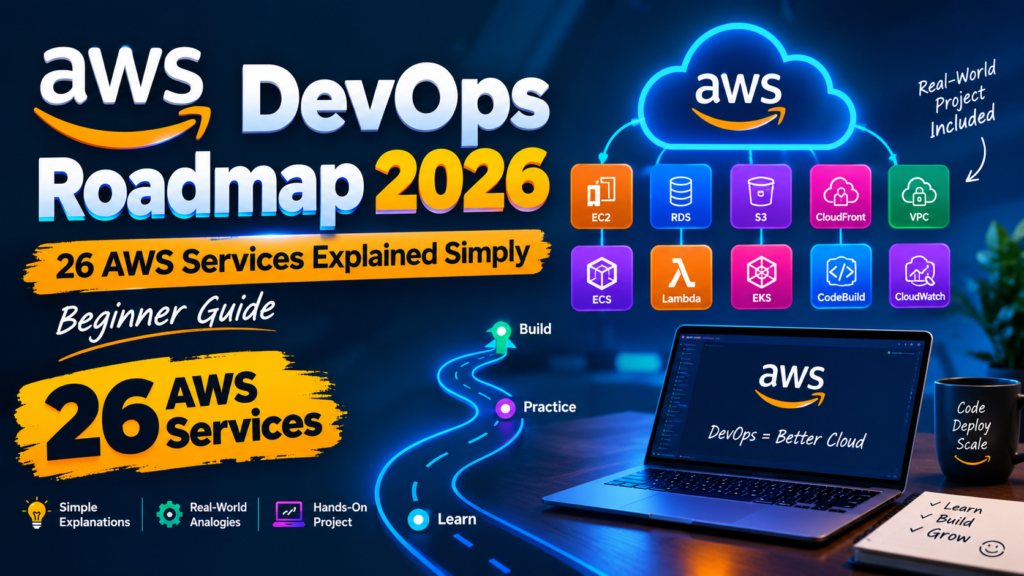
Here’s the good news: you don’t need to learn every AWS service to start DevOps. In this guide you’ll learn the 26 that matter most — in plain English, with simple analogies — and finish with a hands-on project you can put on your CV.
📍 The Roadmap at a Glance
- Security First — IAM, CLI
- Hosting & Storage — VPC, EC2, EBS, S3
- Handling Lots of Traffic — Load Balancer, Auto Scaling, Route 53, RDS
- Monitoring & Alerts — CloudWatch, CloudTrail, SNS, SQS
- Infrastructure as Code — CloudFormation
- Containers — ECR, ECS
- Automatic Updates (CI/CD) — CodeBuild, CodeDeploy, CodePipeline
- Serverless — Lambda, EventBridge, EFS
- Speed & Security — CloudFront, WAF
- The Final Boss — EKS
- Your First AWS DevOps Project
All 26 Services at a Glance (Tree View)
Here’s the whole roadmap as a tree. Each branch is a stage, and you can learn the stages from top to bottom.
- ☁️ AWS DevOps Roadmap
- Stage 1 — Security First
- 01IAM — who can access what
- 02AWS CLI — control AWS with commands
- Stage 2 — Hosting & Storage
- 03VPC — your private network
- 04EC2 — rented servers
- 05EBS — disk for one server
- 06S3 — file storage
- Stage 3 — Handling Lots of Traffic
- 07Load Balancer — spreads traffic
- 08Auto Scaling — adds/removes servers
- 09Route 53 — domain names (DNS)
- 10RDS — managed database
- Stage 4 — Monitoring & Alerts
- 11CloudWatch — monitoring & alarms
- 12CloudTrail — activity history
- 13SNS — notifications
- 14SQS — message queues
- Stage 5 — Infrastructure as Code
- 15CloudFormation — setup as a recipe
- Stage 6 — Containers
- 16ECR — stores container images
- 17ECS — runs containers
- Stage 7 — Automatic Updates (CI/CD)
- 18CodeBuild — build & test
- 19CodeDeploy — deploy new versions
- 20CodePipeline — connects it all
- Stage 8 — Serverless
- 21Lambda — code without servers
- 22EventBridge — events & schedules
- 23EFS — shared file system
- Stage 9 — Speed & Security
- 24CloudFront — faster global delivery
- 25WAF — blocks bad traffic
- Stage 10 — The Final Boss
- 26EKS — managed Kubernetes
- Stage 1 — Security First
Security First
Before you build anything on AWS, you need two things: security, and a way to control AWS.
1. IAM (Identity and Access Management)
Analogy: A security guard for your AWS account.
IAM controls who can get in and what they’re allowed to use. A developer might be allowed to read logs but not delete servers, while an admin might have access to everything.
✅ Golden rule — least privilege: give people only the access they actually need. Nothing more.
2. AWS CLI (Command Line Interface)
Analogy: A remote control for AWS.
Clicking buttons works, but DevOps engineers want speed. The CLI lets you control AWS by typing commands — and you can put those commands in a script and run them again and again.
After installing the CLI, connect it to your account:
aws configureThen check who you’re logged in as:
aws sts get-caller-identityHosting & Storage
To run an application on AWS you need four basics: a network, a server, a disk, and a place to store files.
3. VPC (Virtual Private Cloud)
Analogy: Your own private piece of land inside AWS.
A VPC gives your resources their own network. You decide what comes in and what goes out. The front part (public subnet) can face the internet — that’s where a website lives. The back part (private subnet) stays hidden — that’s where a database lives.
The main gate is the Internet Gateway, and Security Groups act like door locks that control access.
4. EC2 (Elastic Compute Cloud)
Analogy: A computer you rent from AWS.
No buying hardware, no maintaining a physical machine. Need a small computer? Pick a small instance. Need more power? Pick a bigger one. Install your app on it and it’s online.
5. EBS (Elastic Block Store)
Analogy: The hard disk for your EC2 server.
Your data stays on EBS even when the server is stopped. You can also take a snapshot — a backup of the disk at a point in time.
6. S3 (Simple Storage Service)
Analogy: A huge online warehouse for files.
Images, videos, documents, backups — they all go in S3, inside containers called buckets.
aws s3 mb s3://myapp-files-yourname-2026aws s3 cp photo.jpg s3://myapp-files-yourname-2026/⚠️ Keep buckets private unless they truly need to be public. Accidentally public buckets are one of the most common AWS mistakes.
Handling Lots of Traffic
One small server works fine — until thousands of users arrive at once. Then it slows down or crashes. These services keep your app running under heavy load.
7. Elastic Load Balancer
Analogy: Traffic police.
When you run several servers, something has to decide which user goes where. The load balancer spreads visitors across servers, and if one server becomes unhealthy, it stops sending traffic there.
8. Auto Scaling
Analogy: Extra staff for rush hour, sent home when it’s quiet.
During a traffic spike you might need ten servers; at 3 AM, one is enough. Auto Scaling adds servers when traffic rises and removes them when it drops — automatically — so you don’t pay for idle machines.
9. Route 53
Analogy: The phone book of the internet.
Nobody wants to remember a long server address. Route 53 (AWS’s DNS service) turns a simple name like myapp.com into the right address.
10. RDS (Relational Database Service)
Analogy: A filing cabinet that AWS looks after for you.
User accounts, orders and other important data shouldn’t live on your web servers. RDS is a managed database — AWS handles backups, updates and maintenance. You can also enable a standby copy (Multi-AZ) for extra protection.
Monitoring & Alerts
What if something breaks at 3 AM while you’re asleep? You can’t stare at servers all day — AWS needs to watch them for you and tell you when something goes wrong.
11. CloudWatch
Analogy: A doctor checking your system’s health.
CloudWatch tracks how busy servers are, whether there are errors, and whether things are slowing down. You can create alarms like: “If CPU stays too high for five minutes, tell me.”
12. CloudTrail
Analogy: A CCTV camera for your AWS account.
Someone deleted an important resource? CloudTrail records actions in your account so you can find out who did it and when.
13. SNS (Simple Notification Service)
Analogy: A loudspeaker.
One message, delivered to many people — by email, SMS and more.
💡 Remember the pair: CloudWatch sees the problem. SNS sends the message.
14. SQS (Simple Queue Service)
Analogy: The token line at a bank.
When 5,000 requests arrive at the same moment, your system can’t handle them all at once. With SQS they wait in a queue and workers process them one by one — so nothing gets lost.
Infrastructure as Code
Here’s a scary question: if your whole AWS setup disappeared, could you rebuild it quickly? Most beginners can’t — because they built everything by clicking.
15. CloudFormation
Analogy: A recipe.
CloudFormation lets you write down what your setup needs — a server, a database, storage, a network — and AWS reads the recipe and builds it for you. Same result, every time.
Don’t worry about understanding every line yet. Here’s a tiny recipe that creates a private S3 bucket:
AWSTemplateFormatVersion: "2010-09-09"
Description: Private S3 bucket

Resources:
  FilesBucket:
    Type: AWS::S3::Bucket
    Properties:
      PublicAccessBlockConfiguration:
        BlockPublicAcls: true
        BlockPublicPolicy: true
        IgnorePublicAcls: true
        RestrictPublicBuckets: true
Deploy it with one command:
aws cloudformation deploy --template-file template.yaml --stack-name myappAnd delete everything it created when you’re done practicing:
aws cloudformation delete-stack --stack-name myappWhat is Infrastructure as Code?
Don’t let the name scare you. Infrastructure as Code (IaC) simply means writing your infrastructure as code instead of creating it by hand. Your recipe lives in GitHub, changes are tracked, and you can rebuild (or tear down) your whole setup in minutes.
STAGE 6Containers
You’ve probably heard it before: “But it works on my computer!” An app runs fine locally, then breaks somewhere else. Containers solve this.
Analogy: A lunch box.
You pack your app together with everything it needs. Move the box to any computer and the app gets the same environment. Docker is the most popular tool for building containers.
16. ECR (Elastic Container Registry)
Analogy: A private shelf for your lunch boxes.
ECR stores your container images inside AWS, with versions — v1, v2, v3 and so on.
aws ecr create-repository --repository-name myappaws ecr get-login-password --region us-east-1 | docker login --username AWS --password-stdin ACCOUNT_ID.dkr.ecr.us-east-1.amazonaws.comdocker build -t myapp:v1 .
docker tag myapp:v1 ACCOUNT_ID.dkr.ecr.us-east-1.amazonaws.com/myapp:v1
docker push ACCOUNT_ID.dkr.ecr.us-east-1.amazonaws.com/myapp:v117. ECS (Elastic Container Service)
Analogy: A supervisor who keeps the right number of workers on duty.
Tell ECS “keep three copies of my app running” and it does. If one stops, ECS replaces it. With the Fargate option you don’t manage any servers at all — you hand AWS your container and AWS runs it.
Automatic Updates (CI/CD)
Imagine changing one line of code, pushing it to GitHub, and a few minutes later the new version is live — with zero manual work. That’s CI/CD, and it’s where DevOps gets really exciting.
18. CodeBuild
Analogy: Quality control on the factory line.
CodeBuild runs your tests and builds your app. If something fails, the process stops — so broken code never reaches users.
19. CodeDeploy
Analogy: The delivery driver.
CodeDeploy moves your app from the old version to the new one safely — and if something goes wrong, you can roll back.
20. CodePipeline
Analogy: The conveyor belt that connects everything.
Push code → pipeline starts → build → test → deploy. Automatically, every time.
💡 Build just one simple pipeline yourself and DevOps will suddenly “click”.
Serverless
Not every job needs a server running 24/7. Resizing an image, sending an email, cleaning old files — keeping a whole server alive for small tasks is wasteful.
21. Lambda
Analogy: A motion-sensor light.
It stays off until something happens, runs your code, then switches off. Example: a user uploads a photo → Lambda wakes up → creates a thumbnail → done. You pay only for the time it runs.
22. EventBridge
Analogy: An alarm clock (that also reacts to events).
EventBridge tells services when to act — when a new record arrives, when a server stops, or on a schedule like “every night at 11 PM, run this cleanup task.”
23. EFS (Elastic File System)
Analogy: A shared folder.
EBS is a disk for one server. EFS is a folder many servers can use at the same time — one saves a file, the others can read it.
Speed & Security
Once your app has users around the world, two new problems appear: far-away users find it slow, and attackers start knocking on the door.
24. CloudFront
Analogy: Local branches around the world.
If your site runs in the US and someone visits from Pakistan, data travels a long way. CloudFront (a CDN) keeps copies of your content at locations around the globe, so users load it from somewhere nearby — and your site feels faster.
25. WAF (Web Application Firewall)
Analogy: A bouncer at the door.
WAF inspects incoming web traffic, lets normal visitors in, and blocks suspicious requests. AWS provides ready-made managed rules, so you don’t have to write every security rule from scratch.
The Final Boss
26. EKS (Elastic Kubernetes Service)
Analogy: Air-traffic control for thousands of containers.
ECS runs containers nicely. But a big company with thousands of containers needs heavier tooling — that’s Kubernetes. EKS is AWS’s managed Kubernetes: AWS runs the critical control parts, you focus on your applications.
⚠️ Don’t start with EKS. Learn containers → learn ECS → then move to Kubernetes. It will make far more sense.
Cheat Sheet: All 26 Services in One Table
| # | Service | Think of it as… | Used for |
|---|---|---|---|
| 1 | IAM | Security guard | Who can access what |
| 2 | CLI | Remote control | Control AWS with commands/scripts |
| 3 | VPC | Private land | Your own network |
| 4 | EC2 | Rented computer | Running servers |
| 5 | EBS | Hard disk | Storage for one server |
| 6 | S3 | Warehouse | Storing files |
| 7 | Load Balancer | Traffic police | Spreading traffic |
| 8 | Auto Scaling | Rush-hour staffing | Adding/removing servers |
| 9 | Route 53 | Phone book | Domain names (DNS) |
| 10 | RDS | Managed filing cabinet | Databases |
| 11 | CloudWatch | Doctor | Monitoring & alarms |
| 12 | CloudTrail | CCTV camera | Activity history |
| 13 | SNS | Loudspeaker | Notifications |
| 14 | SQS | Bank token line | Message queues |
| 15 | CloudFormation | Recipe | Infrastructure as Code |
| 16 | ECR | Lunch-box shelf | Storing container images |
| 17 | ECS | Supervisor | Running containers |
| 18 | CodeBuild | Quality control | Build & test |
| 19 | CodeDeploy | Delivery driver | Deploying new versions |
| 20 | CodePipeline | Conveyor belt | Full CI/CD automation |
| 21 | Lambda | Motion-sensor light | Serverless code |
| 22 | EventBridge | Alarm clock | Events & schedules |
| 23 | EFS | Shared folder | Storage for many servers |
| 24 | CloudFront | Local branches worldwide | Faster content delivery |
| 25 | WAF | Bouncer | Blocking bad traffic |
| 26 | EKS | Air-traffic control | Managed Kubernetes |
Quick Recap
You started with security, then learned how to host an app with a network, servers and storage. You saw how to handle heavy traffic, monitor everything and get alerts, rebuild your setup from code, run apps in containers, automate deployments, go serverless, speed things up worldwide, block attacks — and finally reach Kubernetes.
26 AWS services. One clear roadmap. You don’t need to memorize them all today — just understand what each one is for.
Your First AWS DevOps Project
Don’t just read this — build something. Here’s a beginner-friendly project that touches most of this roadmap:
- Create a simple website (even a single HTML page is fine).
- Put the website inside a Docker container.
- Push that container image to ECR.
- Run it on ECS (Fargate keeps it simple).
- Put an Application Load Balancer in front of it.
- Describe the setup in CloudFormation.
- Create a CodePipeline so every push to GitHub updates the app automatically.
- Add a CloudWatch alarm that emails you through SNS.
Push the project to GitHub with a README and a simple architecture diagram. That’s something real to show when you apply for DevOps jobs.
💸 Avoid a surprise bill: set up a billing alert (AWS Budgets) the day you start, and delete resources you’re no longer using — load balancers, NAT gateways and running instances cost money even when idle.
Frequently Asked Questions
Do I need to learn all AWS services for DevOps?
No. AWS has hundreds of services, but the 26 in this roadmap cover what most DevOps beginners use day to day. Learn them one at a time.
Which AWS service should I learn first?
Start with IAM. Every other service depends on access control, and good security habits from day one save you from big mistakes later.
Should I learn ECS or EKS first?
ECS. It teaches container fundamentals with far less complexity. Move to EKS once containers and ECS feel comfortable.
Can I practice AWS for free?
Many services have free-tier or low-cost options for learning, but not everything is free. Always set a budget alert and clean up resources after each practice session.
Final Thoughts
This was the roadmap — next we go deeper. I’ll be covering these services one by one, hands-on, in simple language, starting with IAM, the security guard of AWS.
Tell me in the comments: which AWS service confuses you the most? Your answers will decide what I explain next.
And remember — you don’t need to learn AWS all at once. Learn one service. Understand it. Build something with it. Then move to the next.